

 Français
 Deutsch
 Español
 Italiano
How to Make a Custom Laser Cut Wine Box
Mar
Estimated reading time: 7 minutes
Key Takeaways
- Accurate Measurements are Crucial: Measure your specific wine bottle and add a 2-4mm tolerance to ensure a perfect fit, accounting for wood thickness in your design.
- Use Finger Joints for Strength: The interlocking finger joint technique creates strong, self-aligning corners that enhance both the durability and the aesthetic appeal of the box.
- Always Perform a Test Cut: Before cutting your final project, run a test on a scrap piece of the same material to dial in the laser’s power, speed, and frequency settings, preventing waste and ensuring clean cuts.
- Follow a Proper Assembly Process: A dry fit, careful gluing, immediate cleanup of excess glue, and proper clamping are essential for a professional and sturdy final assembly.
Table of Contents
- Designing Your Custom Wine Box
- Choosing Materials and Configuring the Laser Cutter
- Assembly and Finishing Techniques
- Conclusions
- Frequently Asked Questions
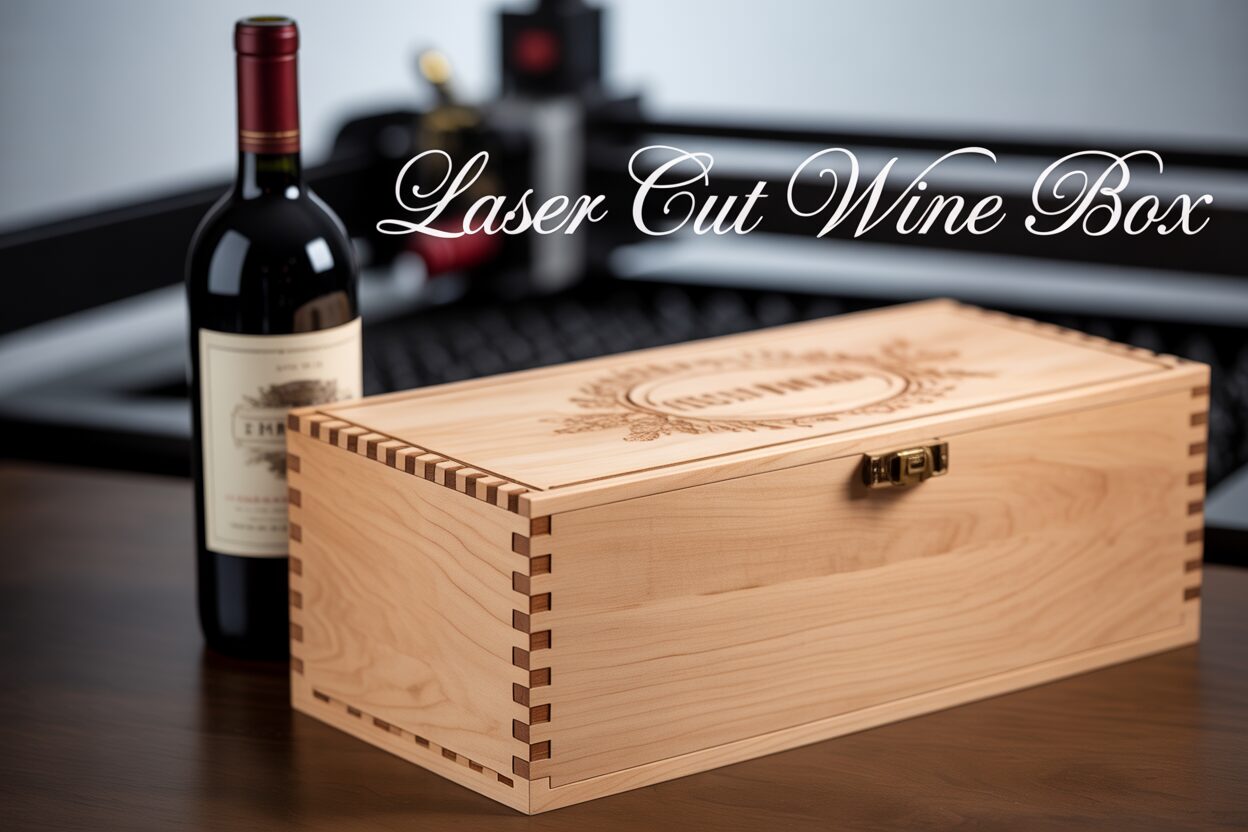
Create a memorable gift with a custom laser-cut wine box. This guide will walk you through the entire process, from initial design considerations and material selection to the final assembly. We’ll explore how to use digital files and laser cutting technology to craft a beautiful and sturdy wooden box that adds a personal touch to any bottle of wine.
Designing Your Custom Wine Box
The foundation of a beautiful and functional laser cut wine box lies in a well-thought-out design. This is the stage where you translate your idea into a digital blueprint that the laser cutter will follow with precision. Rushing this step can lead to a box that doesn’t fit, has weak joints, or simply doesn’t look right, so take your time to get the details perfect. The first and most critical task is taking accurate measurements. While there are “standard” wine bottles, their dimensions can vary slightly between brands and styles. For a truly custom, snug fit, measure the specific bottle you intend to gift. You will need three key dimensions:
- The overall height of the bottle.
- The diameter of the base.
- The diameter at the bottle’s widest point (usually the shoulder).
Once you have these numbers, add a small tolerance of 2-4mm to your interior box dimensions. This ensures the bottle slides in and out smoothly and leaves room for protective padding like wood wool or a felt lining. Don’t forget to factor in the thickness of your wood; your exterior dimensions will be larger than your interior ones.
With your measurements in hand, it’s time to choose your design software. For laser cutting, you need vector design software, which creates paths for the laser to follow. Two of the most popular choices are Adobe Illustrator and Inkscape. Adobe Illustrator is the industry-standard professional tool, offering a powerful and comprehensive suite of features. Its learning curve can be steep, and it requires a subscription, but its precision tools are unmatched for complex designs. A fantastic free and open-source alternative is Inkscape. It is more than capable of handling any laser cut box design project and is an excellent starting point for beginners and hobbyists. Both programs allow you to draw the precise lines for cutting and fill shapes for engraving, giving you complete creative control.
A key structural element in most laser cut boxes is the joint work. The finger joint box technique is overwhelmingly popular for good reason. This method involves creating a series of interlocking tabs, or “fingers,” on the edge of each panel that slot together perfectly. The primary benefit is strength; the interlocking design dramatically increases the surface area for gluing, creating a bond that is often stronger than the wood itself. These joints are also self-aligning, which makes the assembly process much easier and ensures perfectly square corners without the need for complex clamps or jigs. Aesthetically, the exposed finger joints provide a beautiful, crafted look that highlights the precision of the laser cutting process. It is absolutely crucial that the length of the fingers in your design file exactly matches the thickness of the material you are cutting.
Interested in more Boxes? Check out our Boxes laser file designs: Click here!
If designing a box from scratch seems intimidating, you can start with a template. There are numerous online resources where you can find pre-made wine box laser cut files. Websites like Etsy, Vecteezy, and Thingiverse are treasure troves of designs, and a quick search for dxf box files will yield many options. You can also use free online box generator tools that create a custom-sized finger joint box file for you based on your dimensions. Once you have a base file, you can open it in Illustrator or Inkscape to add your personal touch. This is where you can add engraved text, such as names, dates, or a special message. Remember to convert any text to paths or outlines before sending it to the cutter. You can also import logos, create intricate patterns for engraving, or use the shape tools to add unique cutouts, like a window on the front panel that reveals the bottle’s label. Modifying a pre-made file is a great way to achieve a professional result while still creating a one-of-a-kind, personalized gift.
Choosing Materials and Configuring the Laser Cutter
With your digital design complete, the next step is to bring it into the physical world. This involves two critical decisions: choosing the right material for your laser cut wood box and configuring the laser cutter with the perfect settings for that material. Your choice of wood will define the box’s final appearance, durability, and character, so it’s worth considering the options carefully.
- Plywood: Baltic Birch plywood is arguably the most popular choice for laser cutting projects, and for good reason. It’s dimensionally stable, relatively inexpensive, and the light-colored surface veneer provides excellent contrast for engravings. The alternating grain of its layers gives the cut edges a distinct, striped look that many find appealing. A common thickness is 3mm (or 1/8 inch), which is sturdy enough for a box without being difficult to cut. Be aware that lower-quality plywoods can have internal voids or glue pockets that may result in an incomplete cut.
- MDF (Medium-Density Fiberboard): MDF is a composite material made from wood fibers and resin. Its main advantage is its complete uniformity. It has no grain, so engravings are incredibly smooth and consistent, and it’s easy to paint for a fully custom finish. However, it lacks the natural beauty of real wood, and its cut edges resemble compressed cardboard. It also produces a more noticeable odor when cut.
- Solid Woods: For a premium, high-end feel, nothing beats solid wood. Hardwoods like cherry, maple, and walnut create stunning wine boxes. Cherry offers a warm, reddish tone that darkens beautifully with age, while maple is lighter and provides sharp engraving contrast. Walnut provides a luxurious, dark finish. Solid woods are more expensive and can be prone to warping. Their density can also vary, which makes dialing in the cut settings even more crucial.
Once you’ve selected your wood, you must configure the laser cutter. The goal is to find the perfect balance of settings to cut cleanly through the material without leaving excessive charring or “flashing.” The three primary settings you will adjust are power, speed, and frequency (sometimes called PPI, or Pulses Per Inch). Power determines the intensity of the laser beam. Speed controls how fast the laser head moves across the material. Frequency dictates how many times the laser pulses per second. For cutting, you typically need high power and a relatively slow speed to ensure the beam penetrates the full thickness of the wood. For engraving, you’ll use a much lower power setting at a higher speed to simply ablate the surface.
Never assume that a standard setting will work perfectly. Wood is a natural material with variations in density, moisture, and resin content. Therefore, it is absolutely essential to run a test cut before you begin cutting the components for your final laser cut wine box. Take a small scrap piece of the exact same sheet of wood you plan to use for your project. Create a small test file in your design software with a few shapes, like a one-inch square and a circle, for testing vector cuts, and a small filled-in rectangle for a raster engraving test. Start with the laser manufacturer’s recommended settings for your material type and thickness. Run the test and examine the results. Did the pieces fall out cleanly, or are they still attached? Are the edges a light brown or are they heavily charred and black? Is the engraving crisp and deep enough? Adjust one setting at a time—for example, increase the power slightly if it didn’t cut through, or increase the speed to reduce charring—and run the test again. Repeat this process until you achieve a clean cut and the desired engraving depth. This small-time investment will save you from wasting a full sheet of wood and the frustration of a failed project.
Assembly and Finishing Techniques
Once the laser cutter has finished its work and you have a neat stack of precisely cut wooden panels, you’ve reached the satisfying stage of assembly. This is where your digital design transforms into a three-dimensional object. With the right technique, assembling your laser cut wine box is a straightforward and rewarding process. The first, and most important, step is to perform a “dry fit.” Before you even open the glue, slot all the pieces together. The interlocking nature of a finger joint box means the panels should fit snugly. This dry run allows you to confirm that all the parts were cut correctly and to familiarize yourself with how they connect, ensuring there are no surprises once the glue is involved.
After a successful dry fit, disassemble the box and lay the pieces out on a clean, protected work surface. Now you can begin gluing.
- Select a quality wood glue, such as Titebond II, which provides a strong bond and is easy to clean up.
- Apply a thin, even bead of glue to the inside faces of the finger joints on the base and one of the side panels. A small brush can help distribute the glue evenly. Avoid applying too much, as this will lead to excessive “squeeze-out” that is messy to clean.
- Firmly press the panels together. The joints should align perfectly. If the fit is very tight, you can gently tap them into place with a rubber mallet, using a scrap piece of wood to protect the surface from dents.
- Continue this process, attaching the remaining side panels one by one. Use a damp cloth to immediately wipe away any glue that squeezes out of the joints. Dried glue will not absorb stain or finish properly and will be difficult to remove later.
- Once the box is fully assembled, apply gentle pressure with clamps to ensure all the joints are tight while the glue cures. If you don’t have corner clamps, you can use painter’s tape pulled taut across the corners or even strong rubber bands. Check that the box is square before leaving it to dry for the time recommended by the glue manufacturer, typically at least a few hours for a strong initial bond.
After the glue has fully cured (usually 24 hours), you can move on to the finishing touches that will elevate your laser cut wood box from a simple container to a polished gift. The first step is sanding. Even the best wood can have minor imperfections, and sanding creates a silky-smooth surface that is a pleasure to touch. Start with a medium-grit sandpaper (around 180 or 220 grit) and sand all the flat surfaces, moving in the direction of the wood grain. Be careful around engraved areas. You can also lightly sand the edges and corners to soften them slightly. After sanding, remove all dust with a tack cloth or a clean cloth lightly dampened with mineral spirits.
With the surface prepared, you can apply a protective finish. This not only enhances the wood’s natural beauty but also protects it from moisture and handling.
- Oil Finishes: For a natural, warm look that brings out the depth of the wood grain, use a penetrating oil like Danish oil or Tung oil. Apply it liberally with a clean rag, let it soak in for 15-20 minutes, and then wipe off all the excess. This type of finish is easy to apply and repair.
- Stain: If you want to alter the color of the wood, a wood stain is the answer. It is applied similarly to oil but is purely for coloration and should be sealed with a topcoat.
- Varnish or Polyurethane: For the most durable protection, a film-forming finish like varnish or polyurethane is ideal. Apply a thin, even coat using a high-quality brush. Allow it to dry completely, then lightly sand with very fine sandpaper (320-400 grit), wipe clean, and apply a second coat. Two or three coats will create a hard, protective shell with a satin or gloss sheen, ensuring your custom wine box looks incredible for years to come.
Conclusions
You’ve now learned how to create a stunning laser-cut wine box from scratch. This project not only enhances your woodworking skills but also allows for endless customization. Experiment with different designs and wood types to create unique gifts. With the right techniques and a little creativity, you can produce professional-quality, personalized boxes that are sure to impress.
Frequently Asked Questions
Q: What is the best software for designing a laser-cut wine box?
A: For vector design, Adobe Illustrator is the professional industry standard, but Inkscape is a powerful and free open-source alternative that is more than capable for this type of project and is great for beginners.
Q: Why is a test cut so important before starting my project?
A: A test cut is essential because natural materials like wood have variations in density, moisture, and resin content. It allows you to fine-tune the laser’s power and speed settings on a scrap piece to ensure a clean cut without excessive charring, preventing you from wasting a full sheet of wood on a failed cut.
Q: What is the best type of wood for a laser-cut wine box?
A: Baltic Birch plywood (around 3mm or 1/8 inch) is the most popular choice due to its stability, affordability, and excellent contrast for engraving. For a more premium look, solid hardwoods like cherry, maple, or walnut are excellent options.
Q: How do I make sure the finger joints in my design will fit correctly?
A: The most critical rule for finger joints is that the length of the “fingers” in your digital design file must exactly match the thickness of the material you are cutting. For example, if you are using 3mm plywood, the tabs in your vector file must also be 3mm long.

Subscribe to Our Newsletter
And enjoy FREE Download Files, SALE Alerts and Inspiring TIPS
How to Find and Use the Best Laser Engraving Files for Wood and Slate Projects
Pricing Your Laser Engraved Products for Profit
A Comprehensive Guide on How to Price Laser Engraving Jobs
Charcuterie Board Engraving File – Wine & Grapes 3D Illusion…
$4.00Original price was: $4.00.$3.00Current price is: $3.00.(25% off)
Bee and Honey Jar Charcuterie Board Engraving File | PNG Download #007…
$4.00Original price was: $4.00.$3.20Current price is: $3.20.(20% off)
Valentine Love Captions: 6 Charcuterie Board Engraving Files…
$8.00Original price was: $8.00.$5.60Current price is: $5.60.(30% off)
American Eagle Flag Laser Engraving File for Charcuterie & Cutting…
$4.00Original price was: $4.00.$2.80Current price is: $2.80.(30% off)