

 Français
 Deutsch
 Español
 Italiano
A Beginner’s Guide to Making a Laser Cut Box
Mar
Estimated reading time: 9 minutes
Key Takeaways
- For beginners, starting with a pre-made design from an online marketplace or using a simple box generator is the fastest way to a successful first project.
- The material you choose—typically Plywood, MDF, or Solid Wood—is critical. Your choice should be based on the box’s function, desired appearance, and the exact material thickness specified in your design file.
- Always perform a small test cut on a scrap piece of your material to perfectly calibrate your laser’s power and speed settings before cutting your main project.
- Assemble your box with a “dry fit” first to ensure all pieces connect correctly before applying glue. Proper sanding and finishing are the final steps that elevate your project from good to great.
Table of Contents
- Finding the Perfect Design
- Selecting the Right Materials
- The Laser Cutting Process
- Assembling Your Masterpiece
- Conclusions
- Frequently Asked Questions
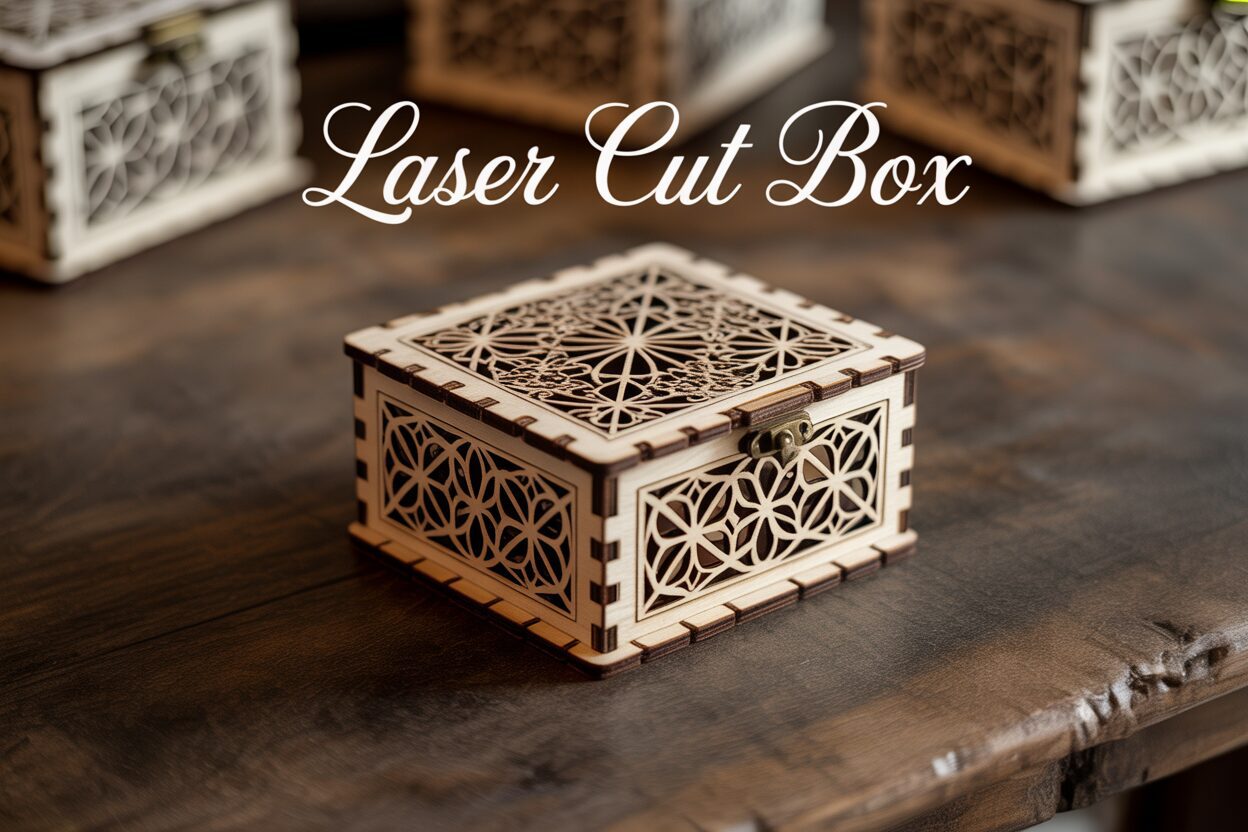
Laser-cut boxes are a fantastic project for both beginners and experienced makers. They can be simple or intricate, functional or purely decorative. This guide will walk you through the entire process, from finding the perfect design to assembling your finished creation, giving you the confidence to start your own laser-cutting project.
Interested in more Boxes? Check out our Boxes laser file designs: Click here!
Finding the Perfect Design
The journey to creating your first laser-cut box begins with a crucial step: securing a digital blueprint. This blueprint, known as a laser cut file, contains the precise vector lines your laser cutter will follow to cut each component from your chosen material. For a beginner, navigating the world of digital designs can seem daunting, but there are several paths you can take, each with its own advantages. The key is to find a design that not only looks good but is also practical for your skill level and intended purpose.
For those new to laser cutting, starting with a pre-made design is the most recommended approach. These professional-grade laser cut patterns are widely available across various online marketplaces and communities.
- Online Marketplaces: Websites like Etsy, Creative Fabrica, and Design Bundles are treasure troves of high-quality designs. A simple search for “laser cut box” will yield thousands of options, from simple gift boxes to complex organizers with living hinges. The main benefit here is that these files are typically created by experienced designers, have been tested, and often come with detailed instructions and recommended material thicknesses. This eliminates much of the guesswork and potential for error.
- Free Repositories: Sites like Thingiverse or Instructables also host free designs shared by the maker community. While you can find some fantastic patterns, be aware that the quality can vary. It’s wise to read the comments and check for photos of completed projects before committing your time and materials.
Using a pre-made file allows you to focus on learning the fundamentals of operating the laser cutter and assembling the final product, rather than getting bogged down in the complexities of digital design software. It’s a shortcut to a successful first project, building your confidence for more ambitious tasks later on.
What if you need a box of a specific size that you can’t find in a pre-made pattern? Before you dive into complex design software, you should explore a powerful tool known as a laser cut box generator. These are web-based applications, such as MakerCase or Boxes.py, that create custom box plans for you. The process is incredibly simple: you enter your desired dimensions (length, width, height), the exact thickness of your material, and choose a joint style—most commonly finger joints. The generator then instantly produces a downloadable file (usually an SVG or DXF) perfectly tailored to your specifications. This is the ideal middle ground, offering complete control over the size and basic structure of your box without requiring any knowledge of vector graphics software.
Finally, the perfect design is one that fits its function. Before you download or create a file, ask yourself: what is this box for? If you need a durable container for tools, you’ll want a design with strong, interlocking finger joints and minimal decorative cutouts that could weaken the structure. On the other hand, if you’re creating a gift for a special occasion, you might search for more decorative laser cut boxes. These designs often feature intricate filigree patterns, engraved lids, or unique shapes that prioritize aesthetics over ruggedness. The complexity of the design will also impact assembly. A simple six-panel box is straightforward, whereas a design with internal dividers, a hinged lid, and elaborate inlays will require more patience and skill to put together. Choosing a design that aligns with both its final use and your current comfort level is the secret to a rewarding and successful project.
Selecting the Right Materials
With your digital design ready, the next step is to bring it into the physical world by choosing the right material. This decision is just as critical as the design itself, as it will define the final look, feel, strength, and even the smell of your project. For beginners, the vast array of laser-compatible materials can be overwhelming, but most laser cut boxes are made from wood or wood composites due to their workability and aesthetic appeal. Understanding the nuances of each type is key to a successful outcome.
The Big Three: Plywood, MDF, and Solid Wood
When envisioning a classic laser cut wood box, you are likely thinking of one of these three materials. Each has distinct characteristics that make it suitable for different applications.
- Plywood: This is arguably the most popular choice for laser cutting. High-quality plywood, like Baltic Birch, is engineered to have a consistent thickness and minimal voids, making it relatively reliable to cut. Its main advantage is its strength-to-weight ratio and the beautiful, natural wood grain on its surface. The layered edge that is revealed after cutting is a signature look of laser-cut plywood projects. However, be aware that cheaper plywoods can contain pockets of glue or voids that the laser may struggle to cut through, resulting in an incomplete cut. It’s an excellent all-rounder, perfect for both functional storage boxes and decorative pieces.
- MDF (Medium-Density Fiberboard): If predictability and a perfectly smooth surface for painting are your goals, MDF is an outstanding choice. It is a wood composite made of fine wood fibers and resin, pressed into a dense, uniform sheet. This uniformity means the laser cuts through it like butter with no variations, producing a very clean and consistent result. The downside is that it lacks the natural beauty of wood grain, and its cut edges are typically a dark, sooty brown. It’s also heavier than plywood and can create a lot of fine dust when cut, so good ventilation is essential. MDF is ideal for boxes that will be painted or for structural components where appearance is secondary.
- Solid Wood: For a truly premium feel, nothing beats solid wood. Materials like cherry, walnut, or basswood offer unparalleled natural beauty. However, solid wood is the most challenging of the three to work with. Its density can vary significantly between the grain and any knots, which can lead to inconsistent cuts. It is also more prone to charring and warping, especially in thin sheets. Because of these challenges and its higher cost, solid wood is often reserved for smaller, high-end decorative laser cut boxes, such as jewelry or keepsake boxes, where its aesthetic value is the primary feature.
While wood is the go-to, don’t limit your creativity. Other materials can produce stunning results. Acrylic, for instance, cuts with a beautiful, flame-polished edge and comes in a vast array of colors, including transparent, fluorescent, and mirrored finishes. This makes it perfect for modern, vibrant boxes. For prototyping or creating lightweight gift packaging, even simple cardstock or matboard can be used. Ultimately, your choice should be guided by two critical factors: the box’s intended function and the exact thickness your design file requires. A design made for 3mm material will simply not assemble if you cut it from 1/8 inch (3.175mm) material, as the joints won’t fit. Always measure your material with calipers before you cut to ensure it matches the specifications of your chosen pattern.
The Laser Cutting Process
You have your design and your material; now it’s time to merge the digital and physical worlds in the most exciting step of the process: using the laser cutter. While these machines can seem intimidating, their operation is based on a few straightforward principles. Approaching the process methodically will ensure a safe, clean, and successful cut every time. The first step happens back at the computer, where you prepare your laser cut files for the machine’s specific software, such as LightBurn or RDWorks. Once imported, you must confirm that the software has interpreted your design correctly. In most laser software, different colors are used to assign different operations. For a standard laser cut box, all the lines in your file should be designated as a ‘cut’ operation. It’s also a good practice to double-check the dimensions of the imported design to ensure it hasn’t been accidentally rescaled. Once the file is ready, you can place your material sheet onto the laser bed, making sure it lies completely flat to ensure a consistent cut across the entire piece.
Dialing in the Settings for a Perfect Cut
With your material in place, the next critical task is calibrating the machine. This involves three key actions:
- Setting the Focus: The laser beam is only powerful when it’s focused to a tiny point. For it to cut effectively, this focal point must be precisely on the surface of your material. Every machine has a method for this, often involving a small physical gauge or an auto-focus sensor. An improperly focused laser will result in a wide, charred line that fails to cut all the way through the material.
- Setting the Power and Speed: These two settings work in tandem and are the most important variables you will control. Power dictates the intensity of the laser beam, while Speed controls how fast the laser head moves. A higher power and slower speed will result in a deeper, more powerful cut, suitable for thick, dense materials. Conversely, lower power and higher speed are used for lighter materials or for scoring lines. There is no universal “correct” setting; it varies dramatically based on your machine’s wattage and the specific material you’re using.
- Performing a Test Cut: This is the single most important tip for beginners. Before you commit to cutting your full set of laser cut patterns, find a small scrap piece of the exact same material and cut a small test shape, like a one-inch square. This allows you to validate your power and speed settings without risking your primary workpiece. If the test piece doesn’t fall out cleanly, you can adjust your settings—perhaps slowing the speed by 5% or increasing the power slightly—and test again. Repeat this until you achieve a clean, efficient cut.
Once your settings are dialed in, position the job on your material in the software, turn on the machine’s ventilation system to extract fumes, close the lid, and press start. It is absolutely crucial to never leave a laser cutter unattended while it is in operation, as flare-ups can occur. After the job finishes, wait a few moments for the smoke to clear before opening the lid. You should now have a collection of perfectly cut components, ready for the final stage of assembly.
Assembling Your Masterpiece
This is the moment of transformation. The flat, separate pieces lying on your workbench are about to become a functional, three-dimensional object. Assembling your laser cut wood box is often the most satisfying part of the entire process, where your digital design and careful preparation pay off. The key to a stress-free assembly is a methodical approach. Before you even reach for the glue, perform a “dry fit.” This means assembling the entire box without any adhesive. The interlocking joints, such as finger joints, should fit together snugly. This test run allows you to understand how all the pieces orient and connect, ensuring there are no surprises once the glue is involved. It’s also your final chance to make minor adjustments, like lightly sanding a tab that might be a bit too tight. For more complex decorative laser cut boxes with many parts, you might even label the pieces with masking tape during the dry fit to keep track of their positions.
Choosing Your Adhesive and Gluing Up
Once you’re confident with the fit, it’s time to make the connections permanent. The adhesive you choose will depend on your need for strength versus speed.
- Wood Glue (PVA Glue): This is the go-to for most wood projects. It creates a bond that is stronger than the wood itself, ensuring a durable and long-lasting box. Wood glue offers a longer “open time,” giving you several minutes to position the pieces perfectly before it starts to set. Apply a thin, even bead of glue to the contact faces of the joints. Once assembled, you’ll need to apply pressure while it dries. While professional clamps are great, simple solutions like wrapping the box tightly with masking tape or using rubber bands work perfectly well for smaller projects. Wipe away any excess glue that squeezes out with a damp cloth before it dries.
- CA Glue (Cyanoacrylate or Super Glue): If speed is your priority, CA glue is an excellent option. It bonds almost instantly, especially when used with an activator spray. This is particularly useful for tacking pieces together quickly or for attaching delicate decorative elements that are hard to clamp. However, the bond can be more brittle than that of wood glue, and it offers almost no time for repositioning. Use it sparingly, as a little goes a long way.
For a standard box, begin by gluing the four side walls to the base, one by one. Once the main body is secure and the glue has set, you can attach the lid.
Sanding and Finishing for a Professional Touch
A well-assembled box is great, but a beautifully finished box is a true masterpiece. The first step to a great finish is sanding. Even the most precise laser cut can leave a slight smoky residue or char on the edges. A quick pass with some medium-grit sandpaper (around 220-grit) will clean these edges up nicely. Pay special attention to the corners and joints, sanding them flush to create seamless transitions between the panels. After the initial sanding, wipe the box down to remove all dust, then go over it again with a finer grit (320 or higher) for a silky-smooth surface. Now, your box is ready for a protective and decorative finish. A simple coat of Danish oil or tung oil will enhance the natural grain of the wood and provide a warm, matte finish. For a more durable, glossy surface that protects against moisture, apply a few thin coats of polyurethane or varnish. And of course, if you used a material like MDF, this is the perfect stage for primer and paint, allowing you to customize your box in any color you can imagine. This final step not only protects your creation but elevates it from a simple project to a piece of handcrafted art.
Conclusions
Creating a laser-cut box is a rewarding experience that combines technology and craftsmanship. By following these steps, you can create stunning, professional-quality boxes for any occasion. Don’t be afraid to experiment with different designs and materials to make your projects truly unique. Now, it’s time to start creating your own masterpiece.
Frequently Asked Questions
Q: What’s the best way for a beginner to get a design for a laser-cut box?
A: For beginners, the best approach is to start with a pre-made design from online marketplaces like Etsy or free repositories like Thingiverse. Alternatively, use a web-based laser cut box generator like MakerCase or Boxes.py to create a custom-sized design without needing any design software knowledge.
Q: What is the most common material for laser-cut boxes and why?
A: Plywood, especially Baltic Birch, is the most popular choice. It offers a great balance of strength, consistent thickness, and the aesthetic appeal of natural wood grain, making it a versatile all-rounder for both functional and decorative boxes.
Q: Why is a test cut so important?
A: A test cut is crucial because laser settings (power and speed) vary greatly depending on the machine and the specific piece of material. Performing a small test cut on a scrap piece allows you to confirm your settings are correct, ensuring a clean cut without wasting your main material.
Q: What’s the difference between using wood glue and CA glue (super glue) for assembly?
A: Wood glue (PVA) creates an incredibly strong, durable bond and allows for several minutes of adjustment time, but it requires clamping while it dries. CA glue (super glue) bonds almost instantly, which is great for speed, but it provides no adjustment time and the bond can be more brittle.
Q: Do I need to sand my laser-cut box?
A: Yes, sanding is highly recommended. It cleans up any smoky residue or charring on the cut edges and helps create seamless, flush joints. A good sanding is the first step to achieving a professional, high-quality finish on your project.

Subscribe to Our Newsletter
And enjoy FREE Download Files, SALE Alerts and Inspiring TIPS
Pricing Your Laser Engraving Work for Profitability
A Comprehensive Guide to Pricing Your Laser Engraving Services
A Comprehensive Guide on How to Price Laser Engraving Services
Charcuterie Board Engraving File – Wine & Grapes 3D Illusion…
$4.00Original price was: $4.00.$3.00Current price is: $3.00.(25% off)
Bee and Honey Jar Charcuterie Board Engraving File | PNG Download #007…
$4.00Original price was: $4.00.$3.20Current price is: $3.20.(20% off)
Valentine Love Captions: 6 Charcuterie Board Engraving Files…
$8.00Original price was: $8.00.$5.60Current price is: $5.60.(30% off)
American Eagle Flag Laser Engraving File for Charcuterie & Cutting…
$4.00Original price was: $4.00.$2.80Current price is: $2.80.(30% off)